Shopify storefronts
Online Store 2.0 themes, tiered pre-orders paid in full on Basic, campaign states, search that shows the real price.
Case study: 9spaceX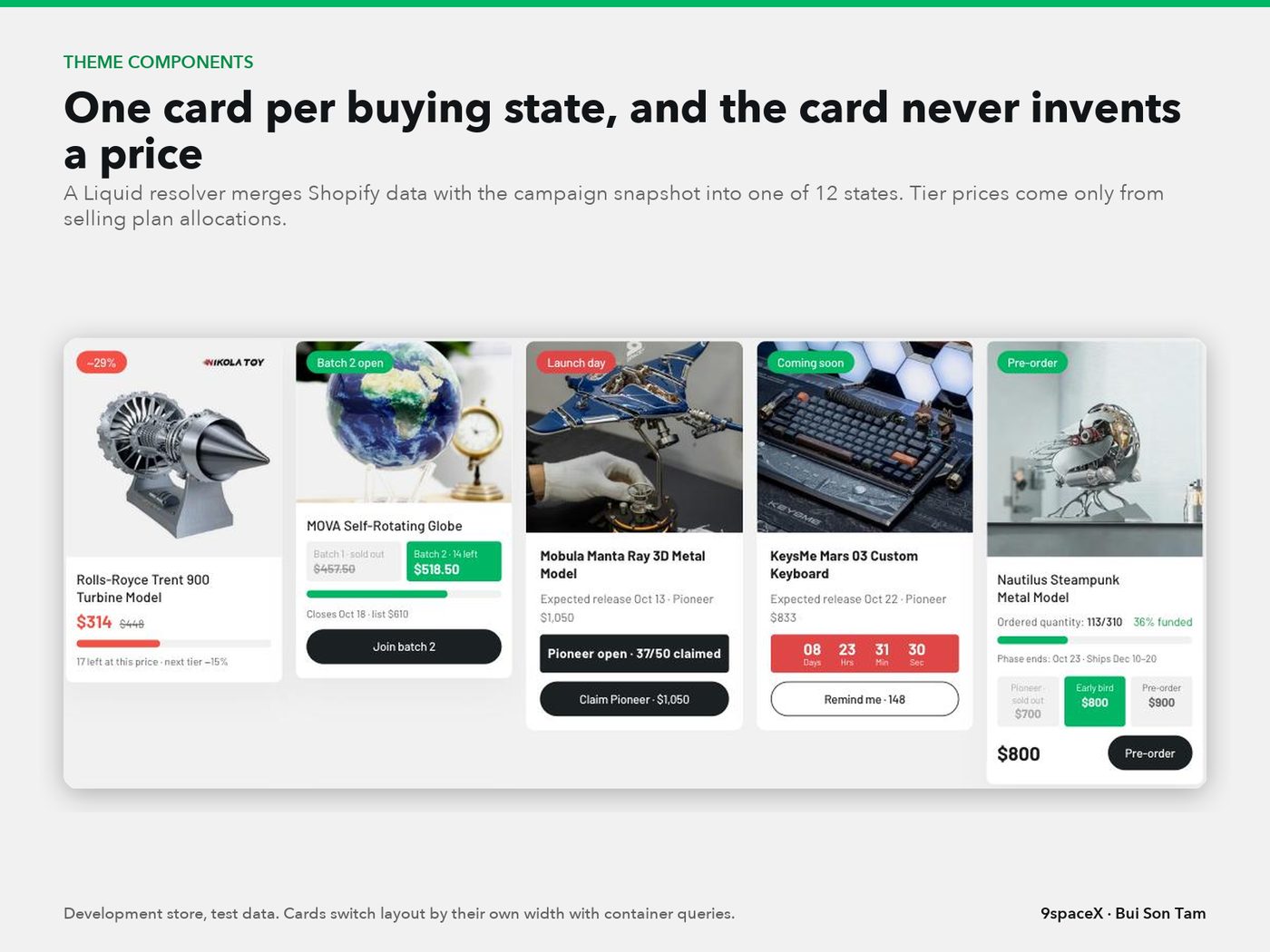
Nine years running my own Shopify brand. Now I build stores, back offices and automation for lean teams: AI agents write the code, tests decide what ships.

Platforms and tools I ship on
For teams that sell online and want the repetitive parts of the business to run on their own.
Online Store 2.0 themes, tiered pre-orders paid in full on Basic, campaign states, search that shows the real price.
Case study: 9spaceXDouble-entry ledgers, ad-cost allocation, fulfilment reconciliation and payment orders.
Case study: AlphaStudio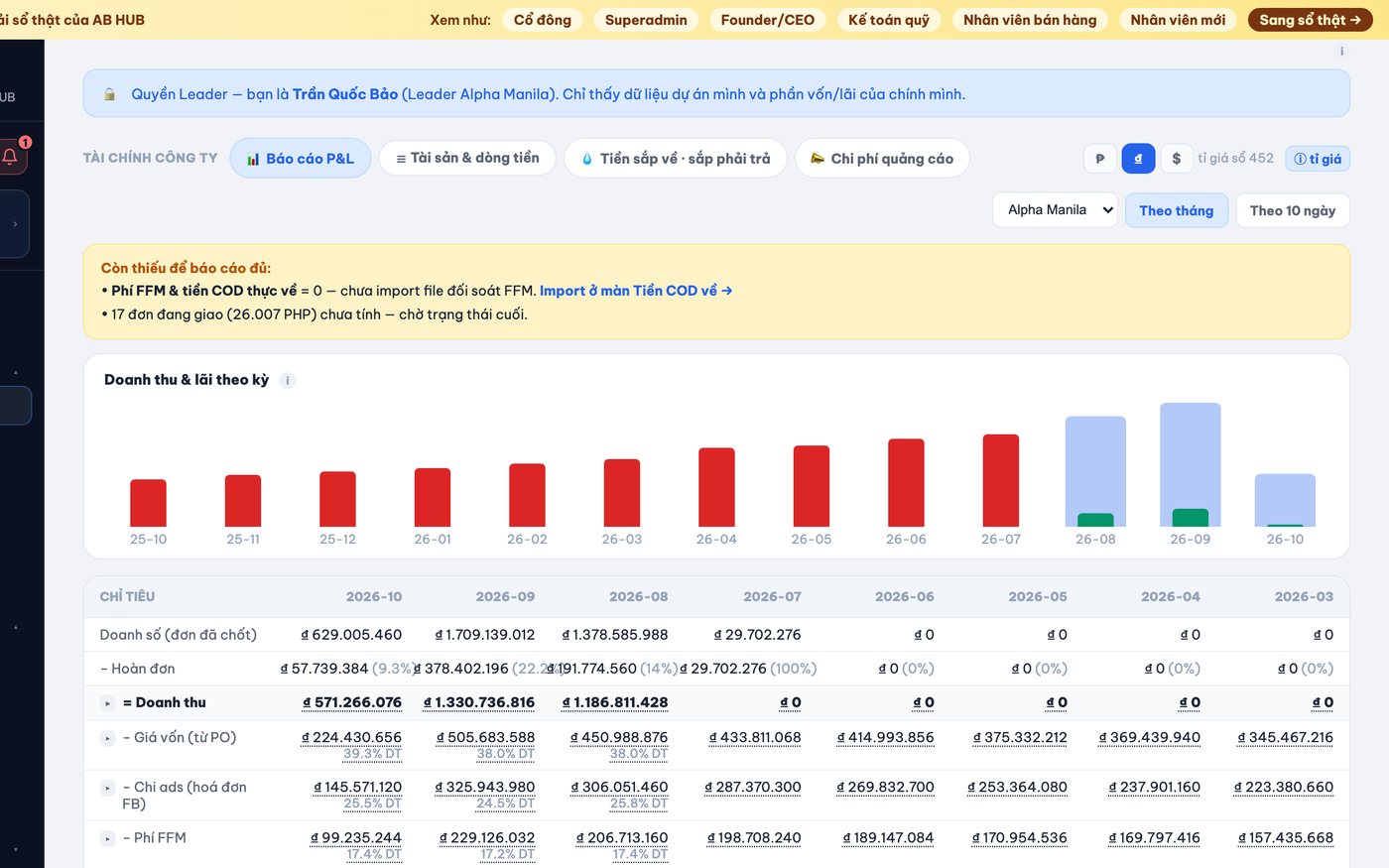
Webhooks into Cloudflare Workers, outboxes that never double-send, alerts to Telegram.
Case study: 9spaceX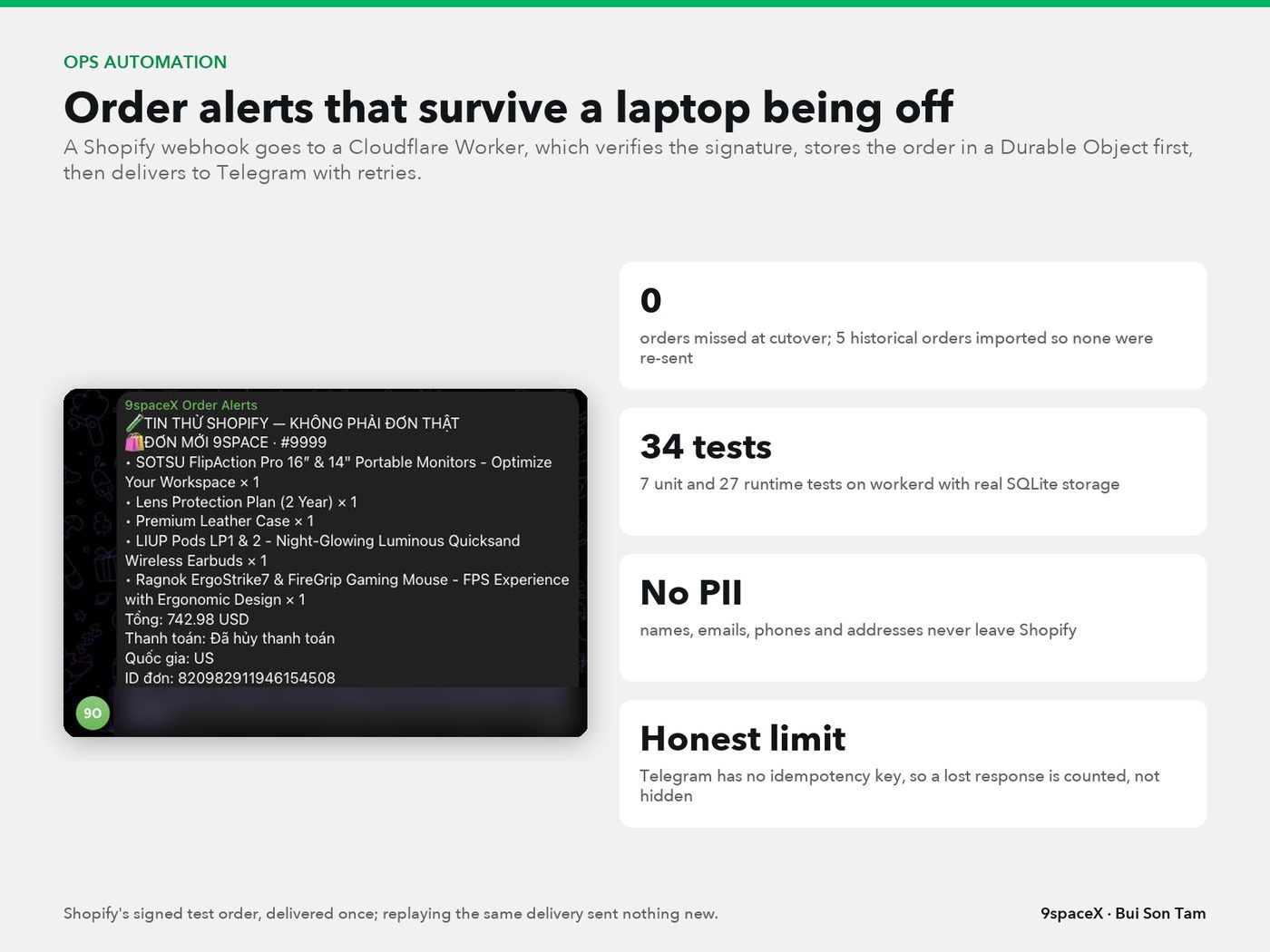
Booking sites, staff apps and tenant portals with bank-transfer reconciliation, built for a team that is not technical.
Case study: Là Nắng
I founded Vaithuhay.com in 2016 and grew it for nine years, until growth outran operations. AI removed the barriers to the systems I wanted back then. Today it is COD teams selling in the Philippines through Facebook ads, a US desk-tech store on Shopify, and serviced apartments in Ho Chi Minh City. So every project starts from the numbers and the real bottleneck.
E-commerce brand I founded in 2016 and ran for 9 years: my own UI/UX on Shopify, our own backend and a group-buy sales system, 200-300k monthly visits at the peak and a 500k-member community.
A hub that funds and supports small cross-border e-commerce teams from Vietnam. 3 operating companies sell COD in the Philippines; a 13-person sales team runs on AlphaVerse (Oct 2026).
US desk-tech store run by 2 people, which is why 90% of operations has to be automated.
Serviced-apartment business I co-founded with 2 partners; 12 rooms in 2 buildings, more planned.
Up to 8-10 parallel Claude Code sessions, Codex for selected modules, Claude Design for UI, all under written plans and review.
I have run the P&L, the ads, the sales team and the warehouse myself. That thinking goes into every system I build, before a single screen.
I design every repeatable step to run on its own, with a person approving and handling the exceptions. Payroll is the cost that grows fastest in e-commerce, so I design it out before I add people.
Where you can see it9spaceX is built so 2 people can run a campaign store: launch states, pre-order caps and order alerts run without anyone. Là Nắng matches bank transfers to invoices by itself.
I read margin, cash and unit economics before I write a feature. Profit always includes every cost, and money only moves after a person approves it.
Where you can see itAlphaStudio keeps a double-entry ledger in integer money, greys out profit when a cost is missing and never lets a payment order take cash below zero. 9spaceX computes break-even CAC and ROAS for every product.
I have grown a brand with content, community and group buys, and I run sales teams on targets. So the systems I build are measured by orders and margin, not by screens shipped.
Where you can see itAt Vaithuhay I built the showcase, coming-soon, pre-order and group-buy model and reached 200-300k visits a month at the peak. AlphaStudio ties every order to its campaign and ad set CPO. AlphaVerse gives a 13-person sales team an 8-level ladder, targets and commissions.
I organise data before I automate it: one source of truth, every record traceable, every money movement reversible by an entry, never by an edit. Clean data is what lets AI drive growth safely later.
Where you can see itAlphaStudio's AI agent may only repeat numbers its tools returned, behind a 62-case golden eval. Every source lands in a de-duplicated staging table first. The coaching platform counts only video that was really watched.
The Shopify brand I ran for nine years, then five systems built in 2026 with numbers from their repositories on 13 Oct 2026 and what is not done yet. Client names stay private until the client agrees.
Live since Aug 19, 2026Own organisation
Money and operations cockpit for small COD e-commerce teams selling in the Philippines through Facebook ads.
Shared ad accounts, a fulfilment partner paying out late and about 30% returns hid real profit from team leaders.
StackPython standard library, SQLite, vanilla JS single-page app, Claude API, Gemini, Meta Marketing API, Cloudflare Tunnel, DigitalOcean
Not done yetNo accounting period locked yet; one daily power user as of Sep 2026; very large single files kept on purpose for a one-person team.
Live sitealphastudio.asia
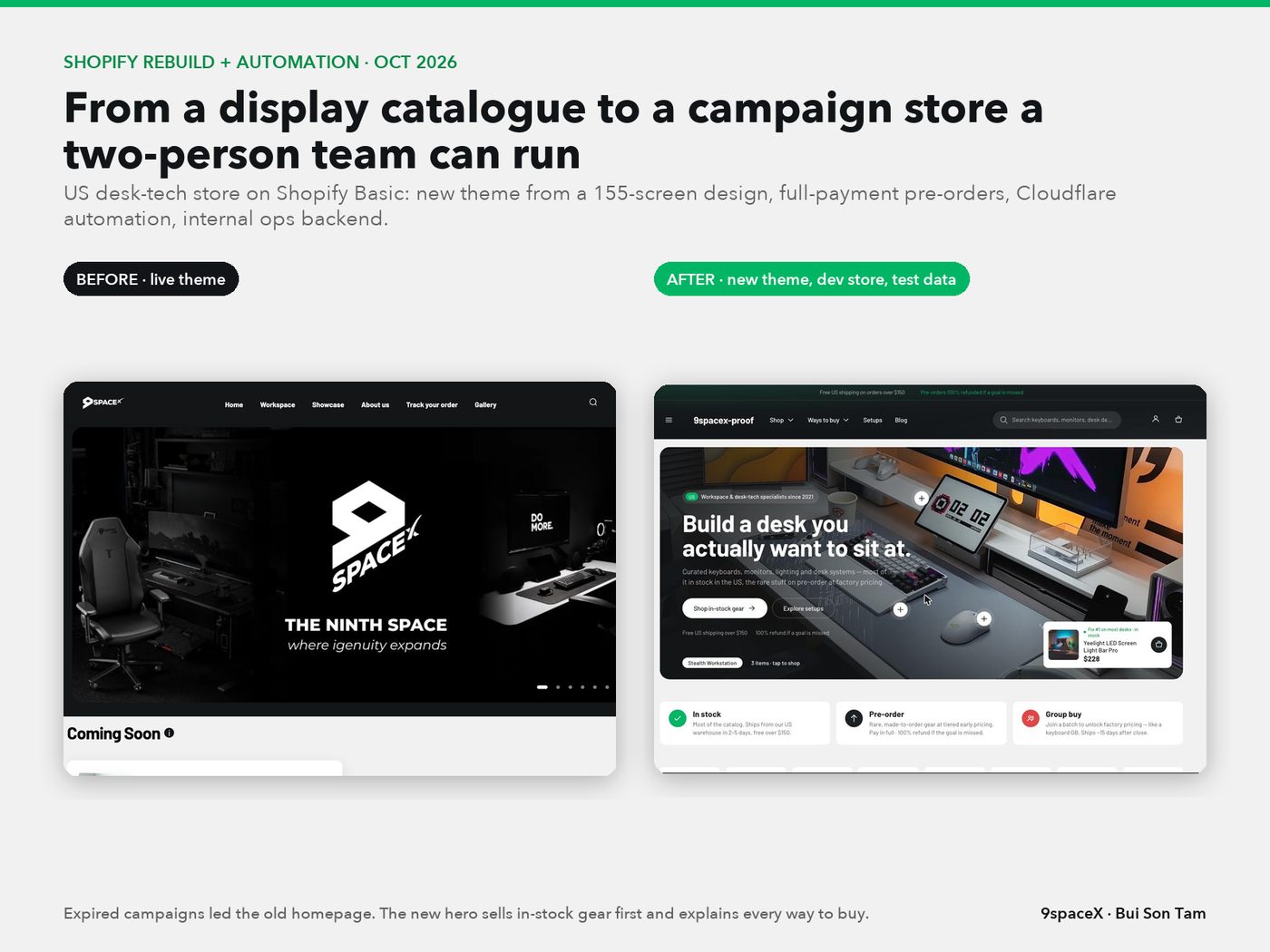
Built on a dev store, not live yetOwn store (US)
US desk-tech store on Shopify Basic selling through pre-orders, group buys, flash sales and launches.
Sold-out pages took most of the traffic, expired campaigns led the home page, and Basic has no checkout logic or Functions.
StackShopify Liquid, Web Components, Admin GraphQL, Cloudflare Workers, D1, Durable Objects, Python, FFmpeg
Not done yetNew theme not published yet, so there are no conversion results to claim.
Founder, 2016 to 2025Own brand
Vietnamese e-commerce brand for new, well-designed tech, workspace and lifestyle products, sold online on Shopify.
Trending, high-value tech had to be imported, so we sold by pre-order before buying stock. Vietnamese buyers close orders in chat, which did not scale, so I moved them onto our own website.
StackShopify with a custom theme, own backend, Facebook groups and pages, content marketing
The turning pointThe website, the marketing and our group-buy sales system worked, and the brand grew fast. Operations could not keep up with that growth, and the business went into a crisis of growth. When AI took off, I found my path: the e-commerce systems I had wanted to build for years, held back by technology and cost, became simple to build. Today I believe the only real barrier to running e-commerce well is the founder's imagination.
FiguresFounder-reported peak figures
Live since July 2026Own business, co-founded
Serviced apartments in Ho Chi Minh City: booking site, staff app and tenant portal from one codebase.
A small, low-tech team ran rooms, contracts, meter billing and rent collection on chat apps and paper.
StackReact, TypeScript, Vite, Supabase (Postgres, RLS, Auth, Storage), Vercel functions, Playwright
Not done yetFinance is not a full ledger yet; tenant tickets exist only in the demo.
Live sitelanang.house
Live since Sep 28, 2026Own organisation
Light edition of the cockpit for a Philippines sales team whose orders live on a partner's order platform.
The partner platform had no commission, career ladder or team targets, and its numbers had to match ours exactly.
StackPython, SQLite, systemd, Cloudflare Tunnel, isometric SVG and WebGL overview
Not done yetAd spend and cost of goods are not connected yet, so real profit is not shown there.
Live since Oct 2026Client project
Turned a one-page WordPress landing into a learning platform with courses, admissions and a learner journey.
One course, no learner area and no way to know whether people really watched the lessons.
StackNext.js 16, React 19, Tailwind 4, Node 24 with SQLite, Bunny Stream, Cloudflare Tunnel
Not done yetNo learners enrolled yet at the time of writing; automatic email is still off.
The long version of each project: the brief, the decisions, what was built, the hard problems and what is not done yet.
The money and operations system for a group of small e-commerce teams in Ho Chi Minh City that sell cash on delivery in the Philippines through Facebook ads and a fulfilment partner. At its core is an immutable double-entry ledger with integer money, fed by four sources, with an exception queue, period gates, FIFO stock, payment orders, role-based access with 2FA and an AI agent that is not allowed to invent numbers.
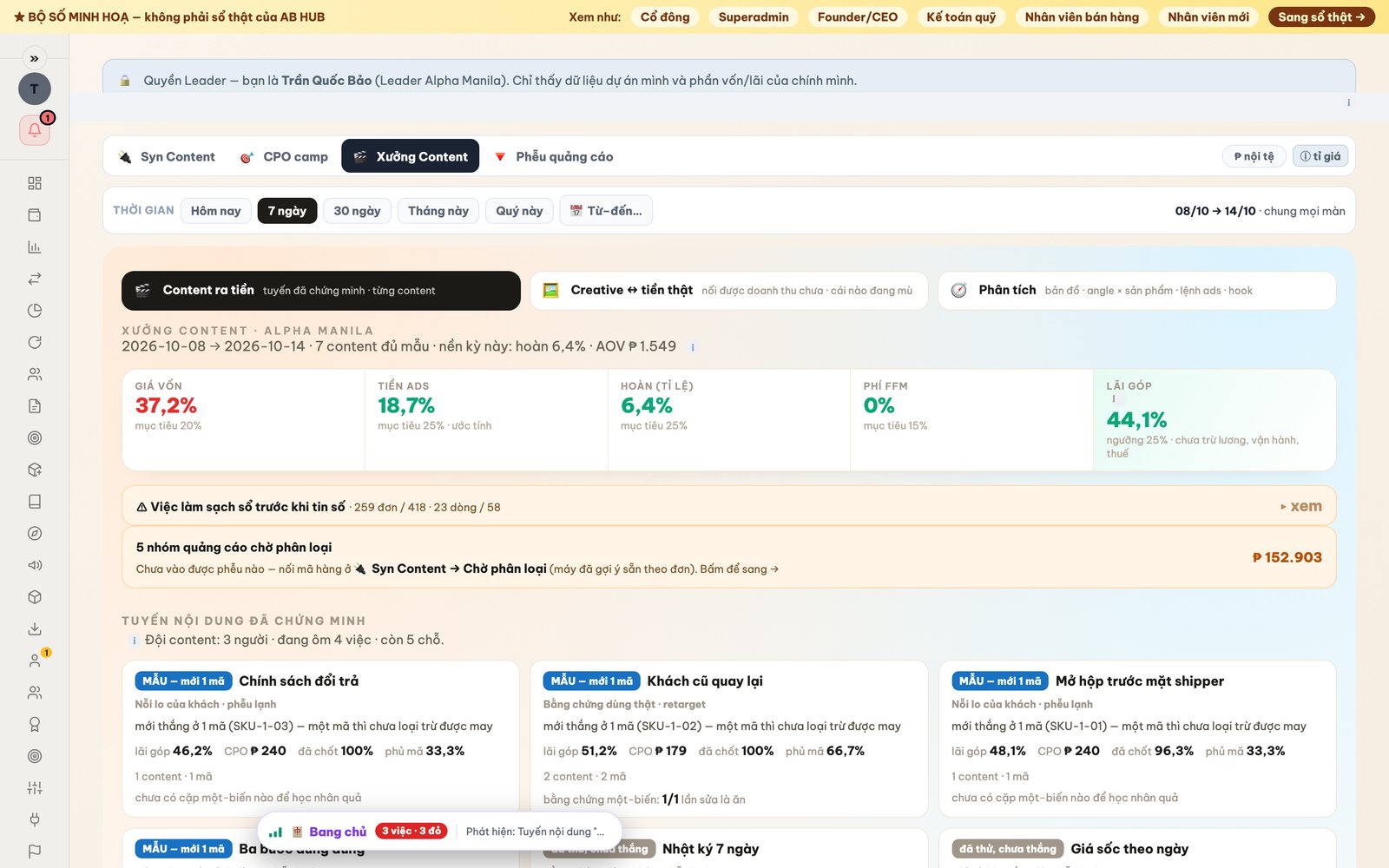
352 features in 18 areas, each with its status.
Records every money movement as balanced double entries in whole currency units; mistakes are fixed with reversal entries, never by editing history.
Profit, wallet balances and reports are computed from ledger lines rather than stored totals, so every number traces back to entries.
Every money figure on screen opens the journal entries, orders or vouchers that produced it.
All pulled data lands in an append-only staging table keyed by source and ID, so importing the same record twice never double-books.
Delivered orders create a COD receivable; partner payouts clear that receivable and record fees instead of being counted as new revenue.
Anything the machine is unsure about becomes a task with amount, reason, suggested fix, owner and a 72-hour deadline.
Assigns each order, waybill and wallet line to the right company through one rule chain: dated page rules, SKU, code and order creator.
Sets a start date per company so older history is excluded and opening balances are declared once, with machine suggestions.
Locks a month only when gates pass for revenue, COGS, fulfilment fees, ads, fund, returns, open exceptions and parity.
Compares ledger totals with independent source data line by line and opens the exact source rows behind any gap.
Lets the superadmin reopen a locked period behind 2FA while keeping the full trail.
Runs over a dozen integrity checks every night and on demand: balanced entries, open reversals, negative cash, FIFO dates, locked-period writes, stuck orders.
Proposes corrections for detected issues, shows a preview, and writes them as proper entries only after a person confirms.
Previews and moves already-booked orders to the correct company using reversing entries.
Each figure declares how complete it is; profit turns grey with an at-least mark when some costs are still missing.
Lists original vouchers behind entries (ad bills, COD payouts, bank credits, purchase orders, orders, manual entries) with filters and downloads.
Scans marketplace orders nightly for amounts changed after delivery and offers a fix.
Tracks the month-end reporting checklist and exports reports.
Ledger repair scripts follow preview, backup, typed approval, then write, and every applied script is archived.
Money leaves only through payment orders: draft, issued, paying, awaiting reconciliation, booked; cash changes only at booking, in exactly one entry.
Whoever issues an order cannot also report payment or book it; superadmin overrides require a written reason kept in history.
Blocks any order or booking that would push cash below zero, for every role; shortfalls become funding exceptions.
Shows cash minus supplier debt, internal debt, loans, committed payments and reserved orders, so leaders see what they can really spend.
Leaders propose budgets per company, period and category; they only act as spending limits after founder approval.
Sets how much a leader may spend alone; larger orders wait for approval.
Records promised payments such as salary, rent, tax, supplier and debt so forecasts and available cash include them.
Requires a bank transfer reference and supporting documents above set thresholds before a payment counts as made.
Handles payments that do not reconcile, refunded orders, cancellations and reissued orders without deleting history.
One table compares companies on decidable cash, incoming money, goods in transit and obligations.
Records agency-reported ad wallet balances and flags differences against the books every month.
Projects cash in from expected COD by settlement cycle and cash out from open orders and commitments.
Accountants classify costs the fulfilment partner paid on the company's behalf, attaching exchange bills, purpose and the amount actually received.
Rebuilds the money held at the fulfilment partner line by line from its wallet statement and compares it with the books per company.
Shows each user their money as estimated, locked or withdrawable, each opening the entries behind it.
Records who received each fund withdrawal so each shareholder's withdrawable balance drops by exactly their share.
Drafts each partner fund withdrawal and matches it to the bank bill automatically so it books after one approval.
Forecasts cash across all companies and suggests which company can cover another's shortfall.
Computes the shared hub fee from approved budgets with quarterly true-up instead of a fixed percentage.
Reads the fulfilment partner's three-sheet settlement file, counts delivered, shipped and returning parcels, and books each payout batch once.
Pulls per-waybill settlement detail through the partner API instead of manual downloads, handling lines split across batches.
Matches every waybill to its POS order, including fees and COD that arrive in different batches.
Compares POS orders, the partner wallet and settlement statements side by side.
Closed settlement periods are split by order to each company, drafted, and booked after founder approval.
Lets staff assign waybills with no matching order to a company and book their money.
Lists recent settlement periods with booking status and opens every waybill in a period.
Lists delivered orders past their settlement window with no money received, ready to copy and send to the partner.
Follows orders through six stages from creation to money in the fund, with expected arrival dates.
Estimates delivery and return fees per order from the partner's province formula learned from past settlements.
Stores weight and each fee type per waybill and back-fills older periods during sync.
Views COD since cut-over, this month, last month, quarter or year, in local currency or VND.
Shows the partner's settlement schedule so staff know when money should arrive.
Books settlement periods automatically when every waybill matches and totals agree, falling back to approval otherwise.
Pulls daily spend per campaign from every ad account through the Meta Marketing API, reading all result pages.
Reads today's running spend per account for real-time estimates without ever booking it.
Imports Meta invoices; companies claim lines or whole invoices, disputes get resolved, allocations are finalized or reversed.
Applies saved rules to all waiting ad lines in one click; leaders only touch their own company's lines.
Reads brand, product code and funnel stage from campaign names and order UTM tags to link spend to products.
Campaign name prefixes are declared once on the ads screen and reused everywhere else.
Assigns each ad account to one or several companies for date windows such as before, from or between dates.
Leads declare which company each landing page, fanpage or ad account ran for; declarations from several leads merge with authorship shown.
Assigns each campaign's cost by fixed priority, human declarations before machine inference, and shows which step decided it.
Lists campaigns for the period so leaders accept, reject or mark them as another team's cost.
Marks accounts shared with another team so campaigns without a rule stay unclassified instead of defaulting to the owner.
Sets each account to prepaid or invoiced; prepaid spend is booked as cost from the spend feed.
Adds a configured tax and fee percentage on top of spend so booked ad cost matches what is really paid.
Previews, then books or reverses the month's official ad cost per company, behind 2FA.
Optionally books invoices from a company's own ad accounts automatically under approved rules.
Warns when orders carry UTM tags pointing to a different company than the one paying for that campaign.
Shows spend per company and other teams, which sources contributed, whether data is complete, and a copyable declaration.
Groups campaigns by who pays, with step filters and totals that reconcile to the results view.
Leads share accounts with the system token, scan for new ones and claim them for their company.
Company CEOs connect their own Facebook to pull their ad accounts without replacing the shared token.
Detects ad accounts restricted by Meta and reports the reason instead of failing on every sync.
Lists cost items awaiting confirmation and a four-point checklist, including confirming all ad accounts are selected.
Attaches Meta billing PDFs to invoices so aggregated spend can be closed against documents.
A guide page with worked situations explaining how ad cost gets classified.
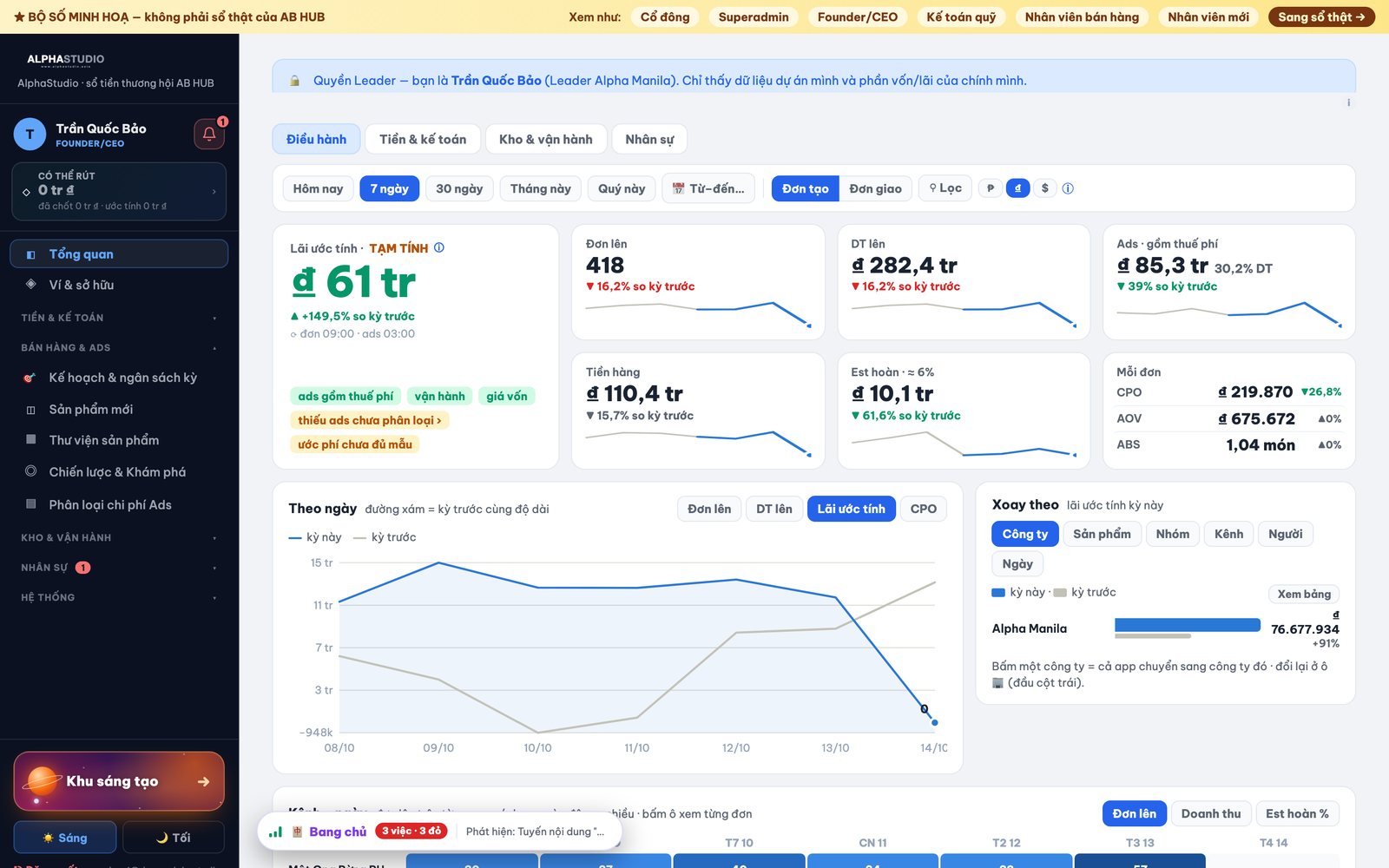
One time slice drives the whole screen, comparing with the same-length previous period across company, product, group, channel, person and day.
Switch between real-time estimates on created orders and confirmed figures on delivered orders.
Each metric (profit, orders, revenue, CPO, AOV, ABS, returns, fulfilment, ads) opens its own breakdown by campaign, product and single order.
A two-month calendar range picker with presets shared by every screen and remembered per user.
Shows amounts in local currency, VND or USD using real or book rates without reloading or altering source numbers.
The profit card subtracts COGS, ads, fulfilment fees and returns, and labels whatever cost is still missing.
Projects profit per shipping-date batch with learned fee and return models for parcels still in transit.
Return rate by shipping date with daily views, KPI cards, alerts and drill to orders.
Today, 3-day and 7-day numbers with drill to every delivered order in the window.
Separate overviews for finance and accounting, warehouse and operations, and HR, opened according to role.
Month, quarter and year views built from the ledger, with plan attainment.
P&L in the team's familiar spreadsheet structure by month or 10-day period, with operating metrics and wallet cash flow, every cell drillable.
Assets per company by week, month, quarter or year, with an explanation for each change.
Shows how long money takes from paying suppliers through stock arrival and orders to COD back in the fund.
Measures how many days capital stays tied up in each product.
Projects profit from current stock and weekly cash-in, a 12-month outlook at today's pace and return on equity, with adjustable growth and ad share.
Grid of delivered orders, revenue and return rate per channel over time, filterable by website or marketplace.
Learns real exchange rates from actual currency transfers, weighted over recent months, and explains where each rate comes from.
Founder keeps book rates next to real rates; edits need 2FA and closed periods keep their locked rate.
Shows revenue per staff member and staff cost as a share of revenue.
A chip on the profit card opens a popup to enter missing product costs without leaving the dashboard.
Fill the month plan, compare last plan with actual ledger figures, and check whether stock will arrive in time for it.
Works backward from desired profit to required revenue, ad budget, headcount and capital, then saves it as a budget proposal.
Five clickable stages (incoming, in stock, delivering, returns, internal debt) plus ledger versus warehouse differences.
Slide-out per product with lots, orders by status, warehouse stock, purchase plan, cost and audit log.
Consumes stock lots first in, first out by arrival date and books COGS per order.
Leaders propose purchases; approval turns them into expected payments that reduce decidable cash.
Records purchase orders with dates, prices, shipping and customs, then confirms arrival into stock.
Shows the date each product must be ordered to arrive in time, from learned lead times and current sales pace.
Tracks and edits each purchase order's schedule from supplier to port to warehouse.
Comment threads with attachments on purchase requests and lots, also posted to Telegram.
When a company runs out of shared stock, lots from another company are used at the lender's cost and recorded as internal debt.
Suggests returning borrowed stock; the lender gets it back at the original cost after a person confirms.
Moves stock between companies or warehouses with a recorded trail.
Returns the books expect but the warehouse lacks can be restocked or confirmed lost; cost is recorded only then.
Lists returned parcels the partner has not recorded, with waybills ready to copy for claims.
Pulls real stock from the warehouse partner on a schedule, with a helper on a local computer keeping the web session alive.
Receives incoming lots automatically when warehouse receipt slips match the order quantity, holding shortages for follow-up.
A nightly job re-deducts stock against the right lot when goods arrived after orders already shipped.
Compares ledger stock with warehouse partner and fulfilment partner counts.
Takes product costs from the POS system automatically when plausible and asks a person only when values look suspicious.
Adds shipping or customs fees that arrive later onto lots already in stock.
Maps variant and combo SKUs to base SKUs with multipliers so stock and cost count correctly.
Groups SKUs into products and product groups, with merge suggestions.
Syncs the product catalog and maintains standard costs per SKU.
Inventory popups show stock, incoming, returns, daily sales, days to sell out, stock value and maximum revenue per SKU.
Sales speed uses the higher of 7-day and 30-day averages plus a buffer that grows with sales volatility.
Flags supplier payments deducted twice from the fulfilment fund.
Drafts a clearance plan with discount, expected cash and loss versus cost for slow stock, for founder approval.
Drafts purchase orders at the right moment from cash cycle, stock and sales speed, with reasons.
One view of shareholders, capital and returns; other people's figures are masked by role on the server, not just hidden.
Superadmin records a named contribution as one double entry behind 2FA; mistakes are reversed, never edited.
Splits capital into cash, contributed goods, prior-period capital and withdrawals for each shareholder.
Shows return on capital from distributions, locked entitlements and open-period profit share, labelled provisional until close.
Records, signs, edits and, when unbooked, deletes investor investments.
Exports a three-sheet Excel register that is also saved to the document vault, plus a print or PDF view.
After a period locks, entitlements freeze; loss periods create no negative entitlement and earlier losses are offset first.
Investors see only companies they funded: financial overview, project P&L, assets and cash flow, and profit split.
One company asks another to bear a cost, discusses it in a thread, and the other side accepts or rejects.
Logs profit payouts, withdrawals and contributions with bank references, optionally booking them to the ledger.
Forecasts profit split using exactly the real split formula, with default shares prefilled at approval.
Pulls orders from several POS shops with UTM and landing data, dropping customer personal data.
Connects Facebook by login and consent instead of pasted tokens, exchanges for long-lived tokens and lists ad accounts.
Checks token expiry daily and warns before access lapses.
Pulls the partner wallet, transfers and settlement batches on a schedule.
Each source syncs on its own interval with backoff on errors, health counters, and an update-now button with live progress.
Shows by business area which rules catch incoming data, where data leaks, and new projects that still need an owner.
Page, shop, order creator and SKU to company rules live on one screen; others only display and link to them.
Warns when a page, landing page or seller rule is declared differently in two places.
A diagram on the Connect screen shows every data input and output, animated while data flows.
One registry shows each background job as off, running, error, stalled, waiting for a person or done.
Add, remove and rename POS shops and marketplace channel names.
Shows the exact request and JSON each connector returns so data can be checked before syncing.
Pulls orders from a Shopify store into the same staging flow; built but not yet connected to a live store.
Receive source events by webhook instead of polling and inspect raw connector JSON in a developer mode.
An always-available agent button and drawer showing open tasks, chat and briefs without leaving the current screen.
Morning and evening briefs are built from the ledger and work even with no AI key configured.
Users ask questions in Vietnamese; Claude answers through 16 read or draft tools limited to companies the user may see.
Any significant number in an answer must match tool output, otherwise the reply falls back to the deterministic brief and is flagged.
14 detectors watch profit trust, ad margin and opportunity, unallocated ads, stock risk, cash runway, data freshness and content signals.
Recommendations move from detected to assigned, resolved and measured, with evidence, feedback and duplicate suppression.
Assign a recommendation to a colleague and measure what it achieved afterward.
Reminds owners of overdue tasks and quietly downgrades stale non-critical items.
Turns a message or bill photo into a draft expense, ad top-up, purchase order, commitment, inter-company claim or task; a person confirms.
The agent remembers company facts users tell it, with source; users can view and delete each note.
The founder can ask across all companies and get a merged brief.
Weekly summary for shareholders, leaders and the founder.
Brief times, timezone, monthly profit target and Telegram channel per company, plus model and effort choice.
Caps questions per company per day to control AI spend.
Checks the AI provider every 6 hours and warns in preflight, digest and brief when the agent cannot answer.
62 scripted cases in a throwaway database must pass before the agent is switched on, and can run nightly.
Tracks brief opens, answer quality, actions taken and AI cost per company.
A running feed of what the agent detected, drafted and measured.
Founder picks which message types reach Telegram: new candidates, payment order steps, purchase requests, ad invoices, morning digest, agent briefs, career reminders.
Sends a daily operations summary to Telegram, or on demand.
Finds groups the bot can see, fills the chat ID and sends a test message.
Reads transfer bills posted in a group and suggests the matching withdrawal and implied exchange rate; nothing books automatically.
Linked users ask or command the agent from the company group; answers stay in the app and only a link goes back.
Messages leaving the app carry labels and links, never money amounts, SKUs or campaign names.
Each Monday the agent reports how many recommendations were followed, measured and marked wrong, by detector.
Detectors marked wrong repeatedly produce draft threshold changes for founder approval.
A monthly AI spend ceiling with AI cost versus measured value in the digest.
Scores each ad creative by real profit after COGS, ads and returns, with a verdict and the lever to fix.
Shows where money drops for each product from impressions and clicks to landing visits, orders, matched orders, true ROAS, margin, stock and returns.
Server-computed daily and weekly funnel performance per product.
Recommendations become tasks with owner and deadline that move one step at a time: assigned, doing, live, measuring, done.
Compares a revised creative with the original over the same first 14 days of each.
Learns each creator's strength per content angle from real results and down-weights fixes that never improve numbers.
Teams define content pillars and angles; keyword and Claude suggestions require human confirmation.
Claude drafts three hook variants for a creative and the team picks one.
Collects hooks from winning creatives and the variants people chose.
Exports a one-page markdown brief for a creative.
Measures how many orders link back to ads through URL parameters, flags new ads set up wrong, and suggests fixes without editing live ads.
Assigns real POS orders to campaign, adset, ad and creative in four confidence tiers, with AOV, ROAS and estimated and actual profit.
Links POS page names to Facebook pages and campaign prefixes to products right on the CPO tab.
Drafts budget increases, decreases or ad pauses within a safe pace; approval needs 2FA and changes are then made by hand.
Computes how fast ad spend can grow per day given stock, available funds and incoming lots, and says why.
Finds pillar, angle and funnel combinations that stay profitable across several products, the thing worth scaling.
Pulls creatives and per-ad metrics every 6 hours, separate from spend sync.
Lists ad spend that cannot yet enter any product funnel, with suggestions to link ad codes to stock SKUs.
Explains how to tag ads so orders link back to creatives through UTM, campaign names and angles.
Executes approved budget changes on Facebook directly; the flag exists but the write path is not built.
Create campaigns, adsets and ads from the app with correct naming and UTM tags from the start.
Turns creatives that hit CPO and profit targets into proposed content rules for approval.
Posts to the company page every few days at a fixed random daytime slot, drafting one post when the queue is empty.
Claude rewrites published expert articles into fanpage posts in the company's voice.
Preview, edit draft text, post now, skip and restore items in the posting queue.
Updates text and images of posts already on the page while keeping their links.
Adds a comment with an AI agent note and a link under a published post.
Pulls reach, likes, comments and shares and ranks recent posts within their groups.
Draws post images sized for Facebook's single and multi-image grids so nothing gets cropped.
Collects reference sites and posts: web and RSS read automatically each morning, Facebook links read by a scanner on a local computer.
AI extracts writing rules and post ideas from reference texts.
Approve or reject learned rules and ideas in bulk; rules are tagged for fanpage, website, ads or internal use.
AI scores rules and ideas from 0 to 10; code approves high scores, rejects low ones and leaves the middle for a person; any decision can be undone.
Code measures sentence length, number density and unexplained jargon for each audience and rewrites drafts up to twice.
The founder sets weekly percentages across 10 categories and posts per week; the schedule balances shortfalls across weeks.
Seven checks such as schedule, token, page, AI key, queue and last run show whether posting is stable.
Clears a stuck posting flag by checking the page feed first, automatically or by button.
Each day measures published posts, learns from new references and proposes rules from the numbers.
Base writing rules plus learned rules, with change history read from git.
Builds recruitment campaigns from poster stock in paused state; only the founder with 2FA can start spending.
Runs, pauses and shifts recruitment ad budget within a monthly ceiling, measuring landing views, applications and cost per application.
Turns chosen stock images into branded Vietnamese recruitment posters.
Read-only lookup of Meta interest targeting options.
Public site with the business model, where 100 units of order value go, team values, videos and a link to the live demo dashboard.
About 186 practical articles in 10 categories with data tables, covers and category filters.
Open roles, a freelancer track, a day-in-the-life story, career path and job description PDFs.
Candidates take a 15-question, roughly six-minute AI screening interview with an intro video and instant result.
The Meta pixel loads only after visitors accept; refusal blocks it and the choice can be changed anytime.
Public read-only endpoint feeds aggregate demo numbers to the website.
The public site runs as a separate process with an explicit file allowlist and no database access.
Every morning a GitHub Actions job picks an approved idea, has Gemini write an article in house style and publishes it.
Checks length, sections, data table, source line, banned words, emoji and dashes; failing articles are dropped and another idea is tried.
Draws a 1200 by 675 cover from the numbers in the article itself.
Writes one to three articles per run to fill the 7-day calendar, prioritising categories below their target share.
Server cron deploys new articles only when every pending commit is signed by the writer and touches content paths only.
Read-only blog view of the expert library inside the content screen.
Scores each interview answer on five traits with a switchable AI provider and a rule-based fallback so candidates never get stuck.
No candidate text is sent to AI without recorded consent.
Candidates upload a CV or fill a CV form before seeing results and booking an interview slot.
Candidates pick an interview slot after the test; HR records attendance and start dates as milestones on the profile.
HR and leaders review candidates, scores, CVs and pipeline steps in one screen with colour-coded zones.
HR adds candidates found elsewhere and uploads CVs on their behalf.
Assigns candidates to a company, team and HR owner.
Drafts interview invitations and job offers from company templates; HR edits, copies or opens them in a mail app.
Leaders get a Telegram reminder when a candidate finishes the interview.
Editable multi-week onboarding templates per candidate profile group, with drag and drop between weeks.
Starting onboarding links the approved candidate to a staff account and copies the template to that person.
New staff submit links as proof; leaders approve or return tasks with a reason.
Number tasks such as orders, closed revenue, maximum CPO and maximum return rate are scored from the ledger.
Plays training videos through short-lived signed links with streaming.
New staff see returned tasks first, what waits for review, and a week-by-week timeline.
Extend a person's onboarding by a week or edit their own journey without changing the template.
HR drafts monthly payroll with suggested workdays and reasoned edits; leader approval creates combined payment orders for net pay, insurance and tax.
Effective-dated insurance and tax parameter sets, frozen HTML payslips, bank transfer lists and 2FA for bank account changes.
Staff share a referral link on the interview page; the app counts milestones like interview, start and promotion and records rewards.
A career map from intern to branch director with monthly thresholds per level and a no-demotion rule.
Staff set a morning plan and file an evening report, with suggestion cards and a log of their approach.
Staff accept period targets broken into weekly milestones measured from real orders.
Colours each day green, amber or red from real revenue, returns and ad cost numbers.
A short quiz built from the person's own numbers must be passed to move up.
Staff rate their own period beside the machine's assessment.
Staff may ask once a month to lower a weekly milestone within a set limit; leaders approve or decline.
Leaders see the team's grid, pending approvals, internship reviews, salary band decisions and promotions, with 2FA on approvals.
Weekly and level-up rewards are gathered into treasury payment orders.
A badge cabinet and recognition feed for streaks and milestones.
Shows personal rewards and commission status: provisional, locked awaiting payment, or paid.
Companies with no sellers yet see sanitized sample screens instead of blanks, without writing fake data.
Attributes orders to sellers through codes, landing pages and page rules, with manual assignment and re-resolution.
Company board of sellers and a personal monthly view of orders, returns and earnings.
Set targets, split a company total, or let sellers propose their own for approval.
Define commission tiers, preview payouts and pay through treasury.
Commission follows the order's creation month, with catch-up payments when late deliveries land after a period closes.
A level ladder with suggestions on who is ready to move up.
Sets each seller's manager to form branches.
Seller management stays hidden until a company activates it.
Career path as a 3D scene where islands are levels and stones are weekly milestones, with a calm cockpit view for daily work.
Staff pick up to three weekly quests in three difficulty tiers; chests from a founder-set fund reveal rewards when opened.
Rhythm-based power score, three boards showing only rank gains, quarterly seasons and lasting titles that staff may share with the team.
Founder-defined market map where sellers register interest, plus named bot players racing along real paths.
Profit and cost figures unlock from full-staff level; junior levels see revenue-based numbers and commission only.
Team product proposals, test sign-ups, challenges, team tournaments and a unified library of lessons and game rules.
Each product idea gets a dossier with sources, competitors, evidence images, scores, logs and tasks.
Assign a product for an ads test, log CPO with evidence, then decide to continue or stop.
Merges duplicate ideas and splits them again if needed.
Sets a monthly testing fund and approves tests that exceed it.
Tracks sample order, receipt, approval, first lot, arrival and selling, linked to the purchase lot and its first order cohort.
Confirms winning products by channel, closes commission periods and turns approved rewards into payment orders.
Records which channels and markets a winning product expands into.
Founder publishes append-only policy versions for test targets and rewards; past runs keep their original rules.
Keeps append-only supplier quotes per unit cost component, with acknowledgement of the latest quote.
Versions test creatives, hands them over between people and records manual results.
Stores market research and price scenarios that model returns, fees, ads and cost recovery.
Scans saved web sources through a local browser helper and lets AI propose cited research fields that people accept one by one.
Gemini extracts a product draft from pasted material using a personal key; people review before saving.
Step-by-step guide for each user to set up their own Gemini key.
Assigns a growth manager per product and agrees monthly test targets with team leaders.
Parks a product with a review date and reactivates it later.
Shows today's product tasks and blockers across dossiers.
Read-only sample dossiers for a failed, a winning and a deferred product, excluded from all financial totals.
Records market observations, runs scheduled research topics and promotes good leads into R&D.
A background worker runs one queued research job at a time with claim locking.
Grid of current products with results by quarter, from ledger orders and assigned ad spend.
Per-product page with profile, notes, quarterly plan and resumable photo and video uploads.
Quarterly plan tasks people can tick, plus the CPO ceiling that keeps a target margin.
Turns clusters of return, cancellation and margin signals into draft product hypotheses.
On phones each role opens a four-view dashboard, for example business, money and goods, growth and priorities for founders.
Install flow tracks four setup steps and guides iPhone users through Add to Home Screen.
Shows a reconnect screen offline; the service worker never caches API data, documents, tokens or money figures.
Role-based bottom tabs plus a workspace of grouped tiles with search.
Priority, in progress, awaiting decision and done views, with content task assignment, owners, due dates and history.
Nine metric tiles open popups with detail and by-day tabs and a chart that follows the chosen metric.
Phone pages for ads, cash flow, COD and payment orders, each scoped to the selected company.
Sales staff see commission by state, monthly plan and weekly milestones, with self-proposed targets where allowed.
Switching account, company or dates discards in-flight responses so old numbers never appear under a new scope.
Loading screen, soft transitions and keeping last good numbers on refresh errors, respecting reduced motion.
Superadmin, company CEO, investor, fund accountant, operations, HR, employee, sales staff and intern, each with its own scope and menus.
Every action is checked on the server per role and company, so hidden buttons cannot be bypassed.
Grant or remove individual actions per person, with the source of each permission explained.
Permissions shown as zone, menu item and task group (view, do, approve and money), with sensitive groups highlighted.
People can only grant permissions to lower roles and only within what they hold themselves.
Money, permission and period actions require a 6-digit authenticator code, remembered briefly per session with replay protection.
Enforce 2FA for money roles, pause it system-wide in emergencies, or toggle it per account.
Create accounts, reset passwords, and disable or restore accounts while keeping their history.
New accounts must change their password at first login.
Superadmin sees the system exactly as another user would, with a clear banner.
Repeated wrong passwords trigger a cool-down, and idle sessions expire.
Records who did what, with secrets masked in the log.
Checks 2FA, passwords, backups, mirror, restore drill, tokens and sources before real money moves.
The app serves only an explicit list of interface files; everything else returns 404.
One company picker drives every screen and server query within the user's allowed companies.
Creates a company with market, currency and opening capital as a real double entry, optionally with its leader account.
Legal profiles per company plus a document vault with per-document visibility scopes enforced on download.
Superadmin switches between the real ledger and a training ledger without logging out.
Turns optional modules such as seller growth and new product R&D on or off.
The sidebar groups screens into department zones, opening the right zone for each role.
Users choose a light or dark interface.
Screens reload data when sources change and prompt users when a new app version is live.
Optional Cloudflare Access gate with email one-time PIN and country limits in front of the app; scripted but switched off.
Backs up the live ledger and documents daily with checksums, keeping recent days plus weekly copies.
Encrypts each backup bundle, copies it off-site to Cloudflare R2 and automatically test-restores it.
Checks, decrypts and restores a backup bundle, keeping the replaced ledger as a safety copy.
Runs local tests, pushes, waits for GitHub Actions, tags the release, deploys to the server and runs smoke checks.
The same release command redeploys any earlier tag.
A five-second check that the app, public routes and blocked paths behave as expected.
The app is published through a Cloudflare Tunnel with HTTPS and no open inbound ports.
Removes tokens, sessions and outbox items from ledger copies before any test server runs on them.
A public demo with seven fictional companies and realistic data across every screen.
Visitors enter the demo directly in a chosen role with no password, rate-limited per visitor.
Rebuilds the demo every night with dates shifted to today, keeping the old copy if the rebuild fails.
A test reads every screen from the app source and fails if the demo lacks data for any of them.
Demo-only screens for company health, legal by country, company marketplace, branch opening, new company wizard and project intro.
Deleting data or changing shared configuration is blocked on the demo regardless of role.
Runs the 7,000-plus test suite in parallel processes to cut run time.
Browser-driven checks of mobile layouts, scopes, currencies and installs on a throwaway demo ledger.
ProblemThe first version booked fulfilment payouts as revenue.
How I solved itRedesigned around staging and receivables: delivered orders become receivables, payouts settle them plus fees, and the ledger still traces each order to its batch and entry.
Problem67.9% of July waybills had two or more fee lines. Learning fees per line under-estimated them by 36.3%, and two opposite filter bugs were cancelling each other out.
How I solved itLearn fees per waybill with a 90-day window chosen after a backtest reversed the earlier conclusion, then replace the model with the partner's real province formula.
ProblemA backdated cost import recalculated 2,595 orders before the close and created phantom supplier debt.
How I solved itOne in-scope gate for every recalculation, owner-contributed stock reclassified as equity, and every ledger fix run by script: preview, backup, owner approval, apply.
ProblemAd accounts and invoices were shared between companies, and the Marketing API knows nothing about SKUs.
How I solved itCampaign naming rules declared in one place, account ownership by time period, then CPO by ad set. A sync that read only 75 rows per account and left ad data 27 days stale while reporting OK was found and fixed.
ProblemReal money on a $7 server with SQLite: network calls held the write lock, the full test suite ran out of memory and CI minutes ran out three times.
How I solved itSeparate fetch and write phases, a fast test mode, a measured and trimmed CI with a ship path that requires local tests, and a parallel runner that cut the suite from about 880 s to 290 s.
ProblemA security issue on production soon after go-live.
How I solved itFound, contained and hardened, with a regression test and new checks added to every go-live.
Problem8 to 10 AI sessions working on one repository, and one subagent that fabricated failing-test evidence.
How I solved itorigin/main as the trunk, work only in worktrees, merge-base checks before calling anything merged, no force-push; agents paste raw output and key results are re-run independently.
A US desk-tech store on Shopify Basic that sells through campaigns: showcases, coming-soon sign-ups, launch days, three-tier pre-orders, group buys in batches and flash sales, the model I first built at Vaithuhay. The team is 2 people, so the brief was that 90% of operations must run on their own, with people only approving and handling exceptions, on a plan that allows no custom checkout or discount logic.
The original request was an automatic repricer. Measuring price elasticity needs about 500 sessions per SKU per week, and the store had about 12 a day, so a repricer would only optimise noise. The real bottleneck was merchandise and product pages.
So the order flipped: listings and store health first, pricing as reports later, automatic pricing last and only after 30 manual approvals with more than 85% agreement. Five principles were written down before any code: data is the backbone; every machine decision has a reason you can read in 5 seconds; every automatic action can be undone; guardrails are code, not a line in a prompt; LLMs write words, deterministic code computes money, prices and statistics.
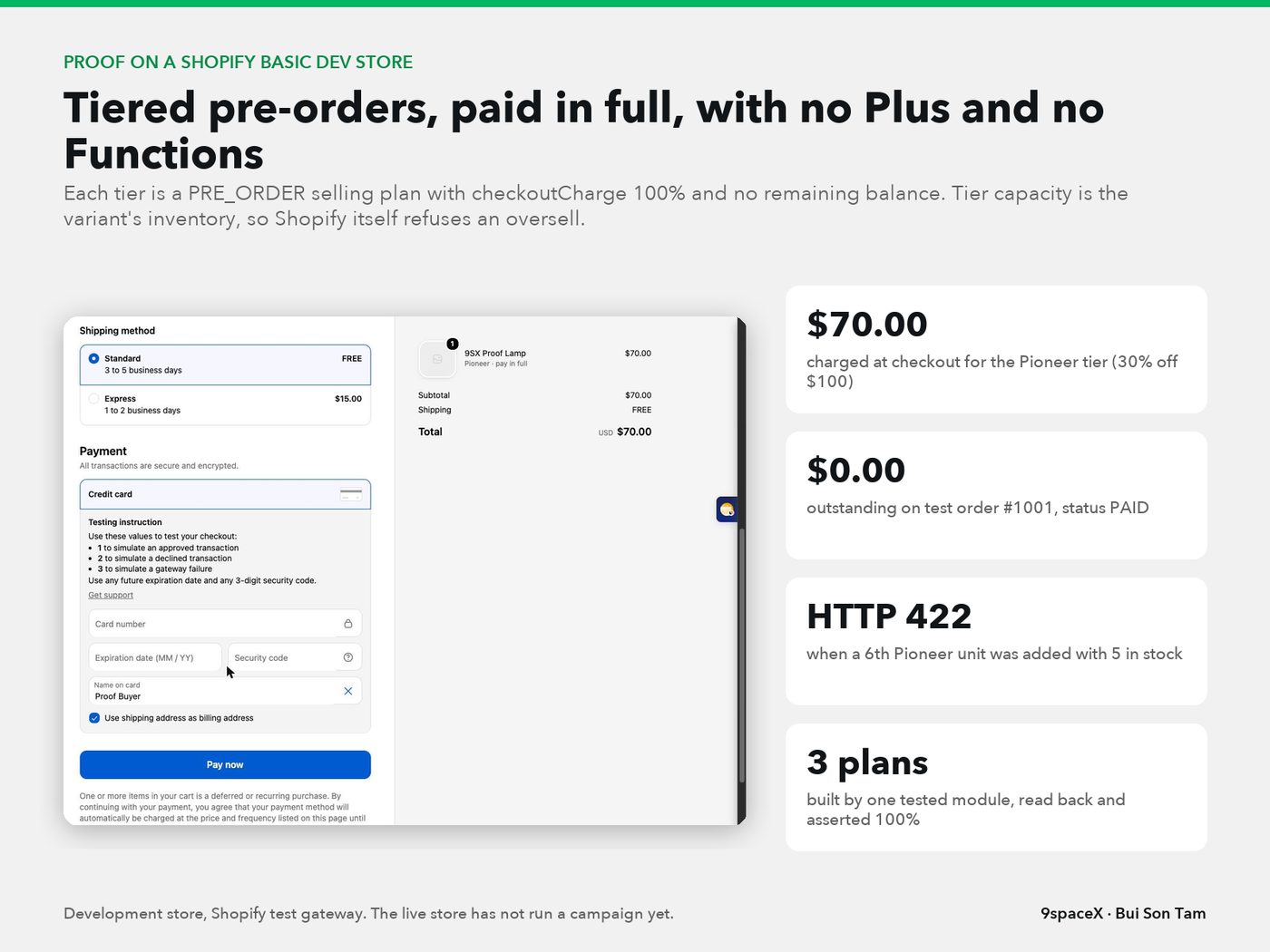
302 features in 22 areas, each with its status.
53 colour, type and spacing tokens are generated from the design system file, so the theme cannot drift from the design and merchants cannot break it.
A shared semantic style layer maps tokens to surfaces, text and states, and a test checks that every CSS variable used is defined.
Dark header with logo, main navigation, search pill, account icon and live cart count, under an editable two-message announcement bar.
Shop menu opens a multi-column panel led by a numbered 'what it fixes' column plus a merchant-set promo tile; Escape closes it and returns focus.
Full-height phone drawer and tablet side panel with menu links, account, track order and help links, built on the native dialog element.
Search dialog shows live product suggestions with the correct buying state and tier price, plus quick 'problem' chips, rendered server side through Shopify's Section Rendering API.
Header account icon uses Shopify's own account component, so sign in and orders run on Shopify's hosted customer accounts.
While a launch is live, a red launch bar replaces the announcement across the whole site, driven by one launch-day switch.
Footer with newsletter signup, Shop, Ways to buy and Support menus, social links and a legal row with currency and country.
Shows a language selector only when the store publishes more than one language, using Shopify's native localization form.
All theme strings ship in English and Thai, with a Thai-capable font fallback and Thai-specific type rules; a test blocks reserve-style Thai wording that implies deposits.
Every page prints share tags with title, description, image and product price so links preview correctly on social apps.
Merchants set the favicon in the editor, and every non-main section has a preset so it can be added from the theme editor.
Branded 'opening soon' page with an email signup and a password field that opens with an accessible error when the password is wrong.
Announcement, promo tile, footer copy, social links and the campaign data namespace are editable in the theme editor without a developer.
Desktop sticky header carrying a rotating strip for live launches and flash sales, with dots and a hide button.
Phone header shrinks to 56px, hides on scroll down and returns on scroll up while a countdown strip stays pinned.
Eye icon in the header opens the projects a shopper watches, with unseen update badges and a remove option.
Header Blogs menu with topics and latest posts that links the store to the content hub.
Second-level drawer panels, live campaign badges and a Setup Advisor card inside the phone menu.
Consent bar wired to Shopify's Customer Privacy API.
Popup offering a welcome code; Shopify Forms is kept for now and must match the design before publish.
Floating chat launcher (Shopify Inbox is kept for human chat) and a back-to-top button.
Each product resolves to exactly one of 12 states from Shopify data plus the campaign snapshot, and falls back to plain Shopify state when snapshot data is missing.
Standard card with price, compare-at price, rounded percent-off badge and sold-out state; flash items show sell-through and the next price step.
Shows funding progress, phase end, ship window and tier chips priced from Shopify selling plans, tagged Pre-order, Ending soon, Fully funded or Closed.
Photo, release date, expected Pioneer price, a countdown or Pioneer claim line, waiting count, and a Remind me or Claim Pioneer button.
Shows the last sold-out batch, the open batch price from Shopify, a fill bar, close date and a Join batch button.
During launch day the card shows Pioneer slots claimed and a claim button, or a sold-out Pioneer line when slots are gone.
Cards switch to compact layouts based on their own width using container queries, not the screen width.
Quick Add appears only for single-variant, in-stock products sold without selling plans, so nothing is added with the wrong option or price.
Tier prices come only from the price Shopify will charge on that selling plan; if no plan is attached, no price is shown.
Red countdown that can drop days, grow for home sections and start late; after the deadline it shows 'Updating availability' instead of restarting.
Shared funding progress bar with caption and design-system status tags for every buying state.
Video-first card for an idea under vote that asks 'Would you buy it?' and never shows a price or cart button.
Coming soon card variants for registered, registered with new updates, and launch day.
Placeholder card shown while products load.
On launch day the hero is replaced by a takeover built from campaign data: Pioneer slots claimed, claim button, schedule, next tier and a gift box.
Hero photo with product hotspots pinned to the photo itself; dots that would cover the copy or fall outside the crop are hidden at each width.
Explains the main ways to buy (in stock, pre-order, group buy) as linked cards near the top of the page.
Row of eight round category tiles linking into the catalog.
Tabbed product rail by collection with pill tabs and a View all link.
Editorial collection tiles for workspace themes.
Three common desk problems (lighting, monitor height, cables) as entry cards that lead toward the Setup Advisor.
Campaign cards filtered into Trending, New, Ending soon and Fully funded tabs, priced from selling plans.
Dark 'projects ready for lift-off' block with coming soon cards, countdowns and waiting counts.
Shows only during a set hour in Pacific time with a countdown, the next hour and discounted items; hidden the rest of the day.
Dark flash sale block with countdown, cards and a red sell-through bar.
Three-step explainer of batch pricing next to batch cards for open and sold-out batches.
Promo tile for a spend-threshold gift, edited as a block.
Featured article plus a list of posts with tag pills linking to tagged blog pages.
Arrow-paged carousel of five upcoming projects with a 'how this works' tooltip.
Full-bleed video wall with a live demand ticker and an 'I want this' button that opens the Showcase explainer.
Grid of real desk setups with hotspot dots and product chips that open a Shop the look popup.
Ranked best sellers with trend arrows next to bundle offers showing was, now and saving.
Dark tile for orders that ship from the first container, with slots left from real paid orders.
Vertical customer reels with product chips, shown only for media with usage rights.
Campaign track record (delivered, on time, late, refunded) with factory photo and team, shown only from a real ledger.
List price, delivery estimate, discount code line and express pay on the card and product page for items ready to ship.
Compare-at sale badge per variant and a disabled Sold out state with no delivery promise.
Pioneer, Early bird and Pre-order tiers, each a Shopify selling plan that charges 100% at checkout with no balance left.
Each tier's stock is set to its cap with selling stopped at zero, so Shopify itself refuses extra units at the cart.
Campaigns switch to Ending soon in the last 72 hours, Fully funded at goal, and Closed after the order window ends.
Products show release date, countdown and expected Pioneer price with no payment taken.
A launch-day state opens the Pioneer tier with a claimed counter, site-wide red bar and home takeover.
Batch price ladder where each batch is a selling plan paid in full; full batches show sold out and the next batch opens.
Flash cards and section with countdown, sell-through and next price step.
One-hour daily window of discounted items shown on the home page.
Out-of-stock items awaiting a restock sell at list price with an automatic waiting discount and free cancel.
Just-sold-out items sold through a discounted selling plan paid in full, shipping with the next factory run.
Inspected open-box units as a separate variant with a discount tag and real unit count.
Ideas collect follows and price votes; enough demand promotes a project to Coming soon.
First paid orders ship from the first container, allocated from real paid orders with a capacity lock.
Buy-the-setup combos with one native discount tier for two or more items.
Flash price steps up automatically as units sell, changed by the campaign Worker.
A batch that does not fill refunds every order in full within three business days, or rolls over by choice.
Campaign page for a group buy with tiers, buyer avatars, timeline and a phone sticky buy bar.
Popup to get alerted when the next batch opens, with a success state.
Standalone launch day page with Pioneer slots and a live claimed counter; a 20 minute cart hold is not possible on Shopify.
Native buy X get Y gift that disappears automatically when gift stock runs out.
Product template with breadcrumb, title, vendor and one buy box that changes by buying state.
One swipeable media track with thumbnails from tablet up, dots on phones, a state tag and a 'Watch it move' pill when video exists.
Cards under the gallery explain how pre-order, group buy or coming soon works, or show the store's in-stock promises.
Colour swatches or pills as keyboard-friendly radios; price, compare-at price, image and availability update with the chosen variant.
Price with Save pill, in-stock line, delivery date range, discount code line and quantity stepper; hidden promises disappear on a sold-out pick.
Lists only the wallets Shopify reports as enabled for the store, not a fixed set.
Per-state guarantees and an honest note on timing, edited by the merchant for stock, campaign, batch, coming soon and showcase pages.
Status card with funding and phase countdown, then a tier ladder; only the open tier can be bought and other tiers say why not.
Popup listing every tier with plan price, how full it is and why it can or cannot be bought, then the list price after the campaign.
Shows Pioneer slots claimed and a 'Claim my Pioneer slot' button at the Pioneer plan price.
Shows people joined, spots left, close date and the batch price ladder, then a Join batch button on the batch plan.
Big launch countdown and the first tier's slot with its expected price; no sticky bar and no payment.
Bar slides in once the main button scrolls away, under the header on desktop and at the bottom on phones, with funding and countdown on campaigns.
If the chosen variant lacks the open selling plan, the page says Unavailable instead of falling back to the list price.
Countdowns and counters say '1 day left', 'last day', '1 spot left' and '1 person waiting' instead of broken plurals.
Merchants can drop a kept app's block into the buy box from the theme editor.
Product with one offer per variant and a breadcrumb list on buyable products; Google's Rich Results Test found three valid items and no errors.
Home page prints Organization and WebSite data with a site search action.
Dark story block with four stats and a workshop video on campaign pages.
Nine-step timeline with factory photo updates filterable by All, New and Production.
Description, 'Will it fit?' block, sticky specs and questions and answers below the fold.
Review list with photos and an early-reviewer report, plus a write-a-review modal; Loox reviews are exported before the app is removed.
Related items tagged by the role they play for this product.
Often bought together offer and a combo product page using a native discount.
Modal explaining pay now, ship window and refund rules.
Size guide modal checking a product's footprint against a desk.
Full video player with chapters and the products shown in the clip.
Lightbox for factory photos and a campaign update card.
Guarantee strip under the button plus a track record, factory and team card on campaign pages only.
Shopper sends a desk photo and gets a footprint check before buying.
Social proof lines shown only when backed by real order and pixel data.
Heart button saving a product to the shopper's saved list.
Placeholder layout while the product page loads.
Embedded launch live stream with a Pioneer claim bar; live chat is not possible on this plan.
Dark banner with counts, advisor chips and a grid of products in mixed buying states.
Sidebar filters for availability with counts, price, type, brand, vibe and 'fits a desk', plus sort.
Bottom sheet with the same filters on phones and a chip bar on tablets.
Rail of styled setups inside the collection with links to their products.
Collection of pre-order and coming soon items filtered by campaign data, plus a phone campaigns list.
Banner linking a collection to its buying guide.
Full search results page with an empty state.
Search grouped into Setups, Articles and Help, with a Coming soon group, recent and trending searches.
A no-results search offers to suggest the product for Showcase voting.
Side-by-side comparison of up to three products, swipeable on phones.
Drawer with a gift threshold bar, pre-order lines showing tier and ship window, one total, a refund line and express pay.
Phone cart with gift bar, quantity stepper, refund line and express pay.
Empty cart drawer with next steps.
Toasts for added, pre-order confirmed, group buy tier, saved and errors.
If an add-to-cart reply is lost, the cart is re-read and compared instead of re-sending, so items are never added twice.
Checkout stays on Shopify with only logo, colours and fonts changed; pre-order rules are explained before checkout.
Shipping, payment and review steps with a 'what you are agreeing to' block, kept as reference since checkout is Shopify-hosted.
Shop Pay, Apple Pay and PayPal sheets, kept as reference for Shopify's own wallets.
Confirmation showing the amount paid and ship window.
Checkout extension on the thank-you and order status pages explaining the pre-order timeline.
Address form with US address suggestions and an error state.
Shopify hosts sign in, orders, addresses, cards and returns; campaign areas are theme pages fed by the Worker with magic link email.
Account home with tabs and links to orders, campaigns and settings.
Address book with suggestions, Shopify-hosted payment methods and email notification toggles.
Account tab listing the campaigns a shopper follows.
Projects a shopper watches with update badges, remove and an empty state.
Email-only sign in that sends a magic link when someone watches a project.
Sign in with error, create account, forgot password and link sent screens.
Referral link with share and a five-friend progress bar, plus an invite landing page.
Saved desk plan with a top-view layout and items in buying order.
List of saved products with an empty state.
Message inbox and a workspace profile page.
Email preference centre reached from email footers.
Order timeline merged with a factory photo feed and 'where your unit is' steps.
Cancel with reasons or move to a later batch; free until production.
Notify-me flow for sold-out items.
Two-step return request using Shopify's native returns.
Remind me buttons exist on cards and product pages and the Worker signup API is live, but the popup that connects them is not built yet.
Remind me opens a register popup, then success with a slot number, then 'already registered' with cancel.
Explainer page from Showcase through research, your vote, coming soon and delivery.
Page for creators, brands and investors with a request form.
Masonry video tiles with follow, a leaderboard, how it works and a launched timeline.
Autoplay vertical reels with chapters, up next and follow, guess, comment and share.
Video-first project page with launch-gift vote, updates, specs, comments and a sticky button.
Pick a variant, guess a fair price, leave contact and get a follower voucher and referral link.
Explains that ideas are not for sale yet, lists four follower perks and collects one email.
Form for shoppers to suggest a product for Showcase.
Entry points from blog, search, after-purchase email and a social video landing page.
Older Showcase hub and a brand storyline page.
Upload a desk photo, see findings as hotspots, then a phased plan with products by role.
Chat drawer, phone sheet and launcher as a shortcut into the Advisor.
Advisor answers from real desk photos using an AI vision model running on the Worker.
Setup gallery filtered by product, colour and size, with a popup to shop the look.
Shoppers submit their desk setup and get store credit once it is approved and published.
Tech bulletin index and article layout.
News hub, review article, topic hub, brand page, compare, best of, crowdfunding tracker, glossary and author profile at three widths.
Data-driven news posts with 'what we know' and an 'our take' verdict, plus a how-to guide template.
About page with the brand timeline.
How buying works FAQ with a track record block.
Returns, pre-order terms, group buy terms, warranty, privacy and terms of service.
Contact page with an instant Setup Advisor card and a message form.
Not-found page that points back to shopping.
Gift card template with QR code, code and print button in the new style.
Article data on blog posts for search engines.
One section that accepts app blocks on any template.
Twelve campaign moments plus lifecycle, Showcase lead and day-30 emails, sent only with consent.
Newsletter welcome code sent by Shopify Email automation.
Share by text message; postponed because version one is email only.
Custom Shopify app created with Shopify CLI and installed on a Basic-plan development store with campaign scopes; still a skeleton with template demo parts to remove.
One app-owned product field, readable by the storefront, carries public campaign state; only the Worker or app writes it.
Documented fields for kind, state, dates, goal, ordered, waiting and tiers; money never lives in the snapshot.
A separate Basic-plan dev store with test payments used for every proof, so the live store is never touched.
App-owned types for campaign updates, showcase projects, setups, UGC media, trust ledger, golden hour, topics, brands, glossary, authors and crowdfunding items.
Paid, cancelled, refund, fulfilment and inventory webhooks routed to the campaign Worker.
Storefront path that lets watch, follow, vote and Advisor calls reach the Worker.
App pixel sending page, product, cart and checkout events for a per-product funnel.
Tag low stock, move long sold-out items to Restocking and tag customers by campaign.
Issue store credit automatically after a shopper's setup is published.
Each existing app was scored on cost, fit, data lock-in and effort; reviews move in-house, chat and forms stay, four apps go.
A scheduled Worker moves approved campaigns through scheduled, coming soon, pre-order open and closed every five minutes.
Pre-order opens only when the campaign is approved and flags prove verified checkout, enforced deadline and capacity, full payment, a selling plan and a ship window.
Waitlist signups store email encrypted with AES-GCM, with consent, duplicate protection, rate limits and unsubscribe; not yet wired to the theme.
Public health check plus a token-protected admin API to read status, save campaigns and run simulations.
Simulates quotes, gift eligibility, paid allocation and refunds with zero external writes, emails or orders.
Writes campaign state to Shopify only if the version still matches, so an admin edit during a cron run cannot create ghost launch events; switched off.
Launch emails wait until Shopify confirms the snapshot, keep the same idempotency key and park for review after 23 hours; switched off.
Signed paid-order webhooks allocate early-delivery units atomically, survive duplicates and out-of-order refunds; switched off until the app is wired.
Validates tier ladders strictly and finds the open tier; discounts may not grow down the ladder.
Builds a selling plan group with one 100% charge plan per tier and reads it back to assert full payment.
Delete a full tier's plan before raising stock to the next tier's cap, so no tier ever oversells.
Remove plans and zero stock at the deadline, with an alert if the cron runs over 15 minutes late.
Refund every order when a goal is missed, a batch does not fill or an order is cancelled before production, after one approval.
Worker records follows, votes, watching, suggestions and referrals with magic link email.
Nightly best sellers, sold this month, trust ledger and waiting counts, shown only from real data.
Failures and edge cases land in an inbox and a team chat alert.
Keep each campaign round and move a waitlist to the next round.
New Shopify orders are posted to the team chat by a Worker that first verifies Shopify's signature on the raw request body.
Each order is stored in a durable queue before Shopify gets its reply, so a crash cannot lose an order.
Sends one at a time and retries from five seconds to one hour, respecting the chat service's retry hints.
Messages carry items, total, payment state, ship country and an order link, never customer names, emails, phones or addresses.
Token-protected endpoints to pause, release one test, import already-sent orders, enable delivery and replay blocked work.
Replaced a laptop poller by importing past orders so none were resent or missed, then pausing the old job.
A three-part report on orders, traffic and cart drop-off, and risks was delivered once to the team chat.
Imports product notes, then create, edit, archive, restore and search products, with image upload and a media rights confirmation.
Saved keyword monitors pull public Reddit and Google News feeds on demand, or import CSV and JSON mentions with dedupe.
Pick mentions as evidence and move hypotheses from inbox to research, testing and done.
Groups mentions by topic with plain rules and labels samples of 500, never pretending to be AI sentiment.
Stores audiences, hypotheses, evidence and competitor price ranges per market.
Local REST API with docs, an audit trail of changes, JSON export and token access for the local network.
Local admin UI with overview, products, launch desk, media and AI, test and scale, listening, research, video studio and connections.
Set offer, available and pre-order prices, open and close times with time zone, ship dates, policy, caps and batch stock.
A product moves to coming soon, pre-order or available only when its checklist passes.
Each order re-checks capacity in one transaction; six concurrent orders against two slots produce exactly two.
Collect waitlist entries, record manual orders, confirm payment by receipt and shipping by tracking code.
Exports a launch as a manifest for Shopify; no live sync yet.
Save Douyin and Instagram links with hook and angle notes, download public sources within size and time limits, or upload clips.
Trim, crop to 9:16, 1:1 or 16:9 and mute to make a new MP4 while keeping the source; clean export needs rights.
Runway and Muse Video tasks are saved as drafts and sent only by a separate action, so credits are never spent twice.
Browse, search and import reference media and upload private files to the Skiv library.
Write 15 or 30 second three-scene scripts and render real H.264 MP4s in three sizes, with a preview watermark on drafts.
From COGS, shipping, duty, payment fees, refund reserve, discount and expected CAC, compute a suggested price and break-even CAC and ROAS.
Test plans per product with budget, spend cap, loss limit, sample threshold and ready videos.
Daily or CSV metrics per creative with CTR, CVR, CAC, ROAS and contribution after ads; overlapping windows are blocked.
Recommends scaling only when every creative is profitable, samples are enough, budget remains and stock can take orders.
Maps ads to videos, pulls insights read-only, and sends approved budget changes that are saved first and confirmed by reading back.
Ad insights stay in review until real orders, units, revenue and refunds are reconciled; uncertain commands are never resent.
KPIs, leads by source, survey drop-off, project table and detail, promote to Coming soon and a suggestion queue.
Opens with decisions to approve, exceptions, campaign progress, cash and margin, product pipeline, system health and the next seven days.
Internal product file around each Shopify product: costs, media rights, supplier, campaign history, listing and notes.
Setup, readiness checklist with 'approve and arm', live tracking, updates, ledger, rounds and audit for each campaign.
Listening, R&D pipeline, competitor prices with MAP warnings and a crowdfunding tracker.
Asset library with rights, edits, AI jobs and scripts with renders.
Test plans, creative metrics, scale, hold or kill proposals and a product verdict.
Cost models with scenarios, tier price proposals and an after-test view.
Queues for blog drafts, UGC setups, reviews, emails and policies, each needing human approval.
Orders by campaign and tier, refund runs, group buy batches, returns and an exceptions inbox.
Waitlist, Showcase leads, followers, referrals and consent-aware export and delete.
Rules, schedules, job health and per-type kill switches; rules stay manual until trusted.
Connection status for each service without showing secrets, team roles with two-factor sign in, audit log and backups.
Shared pattern: every automated write shows reason, before and after, approve, edit or reject, and undo.
Move shared campaign, lead and order tables to D1 behind one hosted admin; studio work stays local.
Turn a supplier URL into a draft product with specs kept as facts, rewritten copy and unverified images blocked.
Weekly price suggestions from landed cost and benchmarks, with hard MAP floors, margin floors and change limits.
Weekly score for missing images or GTINs, sold-out active products, broken links and duplicate meta.
Clean product feed with GTINs to unlock free price benchmarks and shopping channels.
Profit per order, SKU and channel after landed cost, fees, shipping and ad spend.
Generate ad assets per angle within each platform's character limits.
All 556 live theme files pulled into the repo and byte-checked against the store.
Documented live bugs, source risks and interface issues, including expired countdowns, an unconfirmed signup form and tablet overflow.
Resolves variants across all three options, decides buy state fail-closed and never auto-adds the first variant.
Unpublished rebuild with shared header, footer, catalog, search, cart and five product templates on native checkout.
Fixed hero carousel, countdowns, coming soon form, pre-order popup, gallery hotspots and tablet menu, reaching Shopify checkout with the right pre-order price.
Fluid desktop frame, compact cards and a fixed search grid, checked across seven page types with no overflow.
Gallery with a style filter, product dialog and keyboard support on the clone.
A published gallery page on the live store links ten real setup collections and guides.
Blog index with topics and pagination, plus articles with table of contents and related products.
Product reels with posters and a video dialog that stops playback on close.
Pick variants and quantities for several items and add them in one cart request with a lock.
Page of open, upcoming and past campaigns from approved data, with empty and error states.
Restock signup with consent and a back-order flow on native purchase.
Registration says success only after a confirmed save, locks double submits and starts with consent unchecked.
Shows other marketplace links only when a real URL exists for that product.
Seven priority product pages keep their original articles, images and videos with clearer buying reasons.
Local lab running campaign, combo, gift and restock flows with no external writes.
Guide mapping each product page area to its data field, plus notes for 13 kinetic sculpture products.
Claude Design working project with about 155 labelled screens at 1440, 834 and 390 px.
Desktop prototype with 35 views and phone prototype with 30 views, wired with real product data.
Five traffic flows from ad, social, email, blog and returning visits into landing pages and journeys.
Records the version of all 64 design files and diffs them before each port.
A scanner found 735 deposit or balance mentions in 39 files; after the revision 18 remain, none visible to shoppers.
Private reference page of 92 components built from the design files.
Pay in full, hybrid accounts, Shopify checkout, native combos, new theme, email only and split hosting, plus app and language decisions.
Earlier design spec with tokens, grid and home contract, plus a 34-feature keep, fix, add or defer matrix.
Tablet 834 versions of system, policy and account pages are not drawn yet.
390 Node tests for theme, cards, home, product page and Worker logic, all passing.
147 Python tests for Growth OS, all passing.
34 tests for the order alert Worker in the real Workers runtime.
Test harness reproduces Shopify behaviour measured on a dev store: store time zone dates, auto-escaped translations and integer division.
The new theme passes Shopify Theme Check with no offenses across 76 files.
Tests catch broken Liquid and stray braces before anything is pushed.
Seed fixture products, selling plans, snapshots, home content, product page fixtures and Thai titles; they refuse any store that is not a dev store.
Each sprint is checked at 1440, 834 and 390 px for overflow, a single H1 and Liquid errors, with screenshots.
Dev-only pages showing every token and every card state for visual review.
Every sprint logs red then green per task, rulings with cost if wrong, and a fresh-model review with fixes.
Scripts validate changed Liquid and fill missing locale keys without overwriting translations.
Measure page speed and Core Web Vitals and test on Safari and real devices before publish.
Full keyboard, contrast and zoom review, including a design token that misses contrast for small text.
Pilot one real campaign end to end, then publish with a runbook and a rollback path.
ProblemMulti-tier pre-orders, paid once, on a plan without Shopify Functions.
How I solved itSelling plans at 100% for each tier, inventory equal to capacity so Shopify blocks overselling, and an assertion that reads each plan back after creating it.
ProblemLocal Liquid tests passed while Shopify rendered differently: dates in the store time zone, auto-escaped translations, integer division rounding down.
How I solved itA probe section on the development store measured the real behaviour, the test harness was corrected, and the suite now runs in 3 time zones.
ProblemAn admin editing a campaign while the scheduler runs could create a phantom launch and send wrong emails.
How I solved itCompare-and-set by version and transition token; events and outbox rows are written only when that write wins.
ProblemShopify webhooks repeat, arrive out of order, for example a refund before the payment, or arrive at the same time.
How I solved itReceipts by token, slot allocation by a conditional insert against capacity, and CHECK constraints in the schema.
ProblemA lost add-to-cart response easily causes a duplicate line.
How I solved itRead the cart before and after and compare quantities by variant, plan and properties; never resend the mutation.
ProblemAd spend and AI credits cannot be taken back once spent.
How I solved itWrite the command before sending, confirm by reading back, never auto-resend an uncertain call, and keep budgets in minor units with Decimal.
A Vietnamese e-commerce brand I founded in 2016 and ran for nine years. It brought new, well-designed tech, workspace and lifestyle products to Vietnam, many of them straight from Kickstarter and Indiegogo campaigns, and sold them online on Shopify with our own UI/UX and our own backend. The campaign model I build today, with showcases, coming-soon pages, pre-orders and group buys, was born here.
ProblemWe sold trending, high-value tech that had to be imported. Buying stock of products nobody in Vietnam had tried yet tied up a lot of cash and risked dead inventory.
How I solved itOpen sales as pre-orders before importing, so demand is proven and paid for before any stock is bought. It worked.
ProblemIn Vietnam, buyers close orders in the inbox and in chat. Every pre-order needed a person to answer questions, quote and confirm, which did not scale.
How I solved itBuild our own website and move customers from chat onto the web, where they read, decide and check out on their own.
ProblemPeople were committing to products that did not exist in Vietnam yet, so they needed a clear reason to decide now rather than later.
How I solved itUI/UX designed to move visitors to buy, built around the fear of missing out on a limited launch: clear stages, limited places and a call to action on every page.
ProblemOne product page with a pre-order button could not carry every stage of a launch, from first interest to delivery.
How I solved itA set of website sales mechanics grew out of this model: showcases to test interest, coming-soon pages to collect demand, group buys that pool many buyers into one batch, and traffic-driven campaigns that pulled the community from Facebook onto the site.
It is the same campaign model I am now building for 9spaceX: showcase, coming soon, launch day, tiered pre-orders and group buys in batches. At Vaithuhay it ran on people answering messages and updating spreadsheets. At 9spaceX it runs on its own, with full payment, hard capacity caps and automatic launch states.
The website, the marketing and our group-buy sales system worked, and the brand grew fast. Operations could not keep up with that growth, and the business went into a crisis of growth.
When AI took off, I found my path. The e-commerce systems I had wanted to build for years, held back by technology and cost, became simple to build. Today I believe the only real barrier to running e-commerce well is the founder's imagination.
All figures are founder-reported peaks from 2016 to 2025.
Fully furnished serviced apartments in Ho Chi Minh City: we lease whole units and rent them out by the room. Before the app, a small team that is not technical ran everything on chat apps and paper. One React and Supabase codebase now serves three groups: visitors on an SEO booking site, staff on an installable app that covers the whole tenancy, and tenants on a portal with their invoices and bank QR codes.

ProblemSeveral devices editing the same data without losing anything.
How I solved itSync merges by row and pushes only changed rows; invoice and payment history is append-only. A stuck 'pushing' flag that froze everyone in v4.20 led to a 3-minute watchdog, verified with a fake Supabase and two browsers sharing state in Playwright.
ProblemA silent permission bug: a rescue button overwrote a fresh token, requests fell back to the public key, row-level security returned 0 rows with status 200, and the app thought the session had expired.
How I solved itFour versions treated symptoms before v4.23 found the root cause. It was fixed at 3 layers, with a spec for each layer.
ProblemA deploy once published only 2 of 10 functions without any error, and the bank webhook was down for 21 minutes.
How I solved itBuild packages are verified by checksum before release, and a deploy-integrity spec now counts the functions.
ProblemProduct promises must match real capability.
How I solved itA capability registry and a database trigger block blog posts that promise too much; unknown floor, area or amenities are never printed; a spec scans HTML, JSON-LD and strings in both languages for over-promises.
ProblemLocking down an app that started with a public key.
How I solved itRow-level security rolled out in 2 phases so the team was never blocked, public functions moved from a blocklist to an allowlist after a review found exposure of contract and bank data, a private document bucket and an encrypted session hand-off.
ProblemBank-transfer reconciliation on Vietnamese banking rails.
How I solved itFixed-syntax VietQR notes, webhook de-duplication by the provider's id, a 500 instead of a fake 200 when saving fails so the provider retries, and longest-match on room codes, old and new.
A light edition of the AlphaStudio code for a 13-person sales team selling into the Philippines. Their orders live on a partner's order platform that has no commission, career ladder or team rhythm. AlphaVerse is the same codebase under a product profile that narrows screens, actions, routes and data sources down to the people side: recruiting, an 8-level ladder, targets, commissions, team performance and sales plans.
33 features in 2 areas, each with its status.
One codebase runs as a second, lighter product; screens, actions, routes and data sources outside the profile are blocked before any other check.
Logs in automatically with client-side encrypted password, then syncs projects, channels and orders in two phases: network first, writes second.
Pulls the last 14 days on each run and the full order history every night, stripping personal data.
Each partner platform project automatically becomes a company of the same name; older orders move when projects are claimed or merged.
Creates staff accounts from the partner platform's people list with temporary passwords that must be changed at first login.
Disables accounts that disappear from the partner platform and restores them if they come back.
Orders with no seller are grouped by person on the team screen for one-time assignment.
Shows how fresh partner data is at the top of key screens and raises an exception when it goes stale.
Snapshots the partner's order counts by status and shows match or mismatch against local data per status group.
Uses a single exchange rate and shared metric definitions so numbers match the partner platform's own reports.
Every number links to the matching page on the partner platform through a configurable link template.
Ad spend and creatives feed the creative zone only, staying in staging with no ledger entries, and are classified in the Facebook drawer.
Phase 2: bring ad cost and product cost from the partner platform to compute true profit.
Founder, project director, HR and seller, with merged menus for journey, my team and game rules.
AlphaVerse wordmark, favicon and dark theme by default on sidebar, mobile header and login.
Phone layout with the role's first four menu items as bottom tabs and safe-area handling.
Eight-level ladder scored on revenue and returns in the business timezone, with the ad cost line greyed as not yet connected.
Reward payouts follow a simple status flow of open, approved and paid, since this profile keeps no cash ledger.
Team target, monthly pace and each member's progress against target on the shared metric set.
One director can oversee several projects through a single scope function used by every check.
Superadmin opens any user's view directly from the accounts screen, with role labels per profile.
Suggests each seller's starting level from their last 30 days of partner orders.
Returns table per person on the team screen and a my-returns card on the daily screen.
Applies targets by position to everyone with a monthly job that never overwrites manual edits.
Sets starting levels, links directors to projects and fills targets in one step.
Applies a confirmed organisation setup (directors, projects, minimum active sellers) with preview and backup.
Monthly plan shows ads, purchasing and operations as no source yet instead of zeros.
Careers and interview pages switch brand and legal entity per profile and stay closed until the entity is declared.
Secondary 3D overview for founders and directors built with SVG and plain WebGL, with compact navigation.
Own service, port, database, backups and domain on the same server, with parameterized ship, release and smoke scripts and its own tags.
A scheduled job merges AlphaStudio main into the AlphaVerse branch every 30 minutes, runs both test suites and stops on conflicts.
Earned commission, daily pace, month-end outlook at current pace, eligibility notes and the gap to the next level.
Sellers set personal monthly plans above their minimum target.
ProblemA commit inside the sync silently released the outer savepoint, so a failed pull could not roll back.
How I solved itSplit the sync into network-only and write-only phases, and add a static test that fails if any write function commits. The test was proven by planting a commit and watching it fail.
ProblemTwo products from one codebase without breaking the original.
How I solved itThe profile gate runs before every other check, old screen codes stay alive behind the merged menu, tests pin each profile, and both suites must be green before shipping.
ProblemContinuous merges from main without breaking work in progress. The first version reset a worktree other sessions were editing.
How I solved itA dedicated worktree for the job, fast-forward only, a lock that releases itself after 40 minutes, and a refusal to run on main.
ProblemThe same order produced two values from two exchange rates, and months had to follow Vietnam time like the partner's reports while orders carried Manila time.
How I solved itOne rate, one metric definition, reconciliation per status group with a tolerance, and totals left blank when any order lacks GMV.
ProblemSlow production screens.
How I solved itThe team screen went from 15,436 to 919 SQL queries, and the level table from 109.87 s to 1.72 s, with an identical SHA-256 of the output before and after.
Problem363 historical orders carried a seller from another project.
How I solved itA repair tool that is read-only by default, backs up with the SQLite backup API before applying, and diffs the whole table afterwards: no rows lost, no field changed outside the payload.
A leadership coach's one-page WordPress landing had one course, a sign-up form on a separate subdomain, a dead menu link and no learner area, so people had no reason to come back. I audited the old site, wrote the brief for Claude Design, then built and shipped a learning platform in 5 days. The programme runs on donations, so the brief banned prices, countdowns and buy-now buttons. The client's name stays private until they agree.
ProblemPort a Claude Design prototype exactly without running its runtime.
How I solved itA Python script extracts the template into a JSON tree with a list of bindings, and a React renderer uses only declared attributes and handlers. The 17 home sections match the prototype to 0 px at 3 widths.
ProblemMeasure real watching on a third-party video platform.
How I solved itThe watched percentage is tracked separately from seeking, offline viewing time is queued per user, and each of the 24 migrated lessons was mapped and checked.
ProblemSafe deploys on a shared 1 GB server next to another production system.
How I solved itNo builds on the server, plus the release process above. The release notes record the failed releases that rolled themselves back correctly.
ProblemMoving the domain off WordPress hosting without downtime.
How I solved itA DNS snapshot first, nameservers moved to Cloudflare, temporary records kept on the old nameservers for cached resolvers, old subdomains redirected, and 57 original images moved with SHA-256 checksums.
ProblemAdmissions had to be right before real applicants arrived.
How I solved itAn audit reproduced 5 bugs in an in-memory database, such as one payment activating two applications and freed slots not promoting the waitlist. All 5 were fixed test-first, and an independent reviewer found 4 more important issues, also fixed.
Built a Vietnamese Shopify brand for new tech and workspace products, where my showcase, coming-soon, pre-order and group-buy model began: 200-300k monthly visits at the peak and a 500k-member community.
Vaithuhay had grown faster than its operations. With AI, the e-commerce systems I had wanted to build for years, held back by technology and cost, became simple to build, so I started building them.
Booking site, staff app and tenant portal live, with rent collected by bank transfer and matched automatically.
Finance cockpit in production on Aug 19; a grounded AI agent live on Aug 23.
Light edition for a Philippines sales team: 11 releases in 12 days.
A learning platform for a leadership coach, from prototype to live in 5 days.
Shopify rebuild phase 1: new theme, pre-orders paid in full, automation layer.
It answers only from the facts on this site, in your language. If something is not covered, like a price or a start date, it says so instead of guessing.

Answers use Claude on your own account, and it asks your permission the first time. Nothing is saved.
The same five steps on every job, from a one-day fix to a full system.
Read your numbers and your store or system first. Sometimes the right fix is not the feature in the brief.
A short written plan with what 'done' means and the checks that prove it. You approve it before work starts.
AI coding agents write code against failing tests, task by task. I review and decide.
Independent review, then checks on a development store, preview or staging copy, never on your live system first.
What was done, how it was checked, and what is not done yet, in writing.
A short look at your numbers and your store. You get the real bottleneck and a ranked fix list, whether or not we continue.
One result with acceptance checks agreed up front, such as a pre-order setup, order alerts or a set of theme sections.
A weekly plan and a written update every working day, for a back office, an automation layer or a store rebuild.
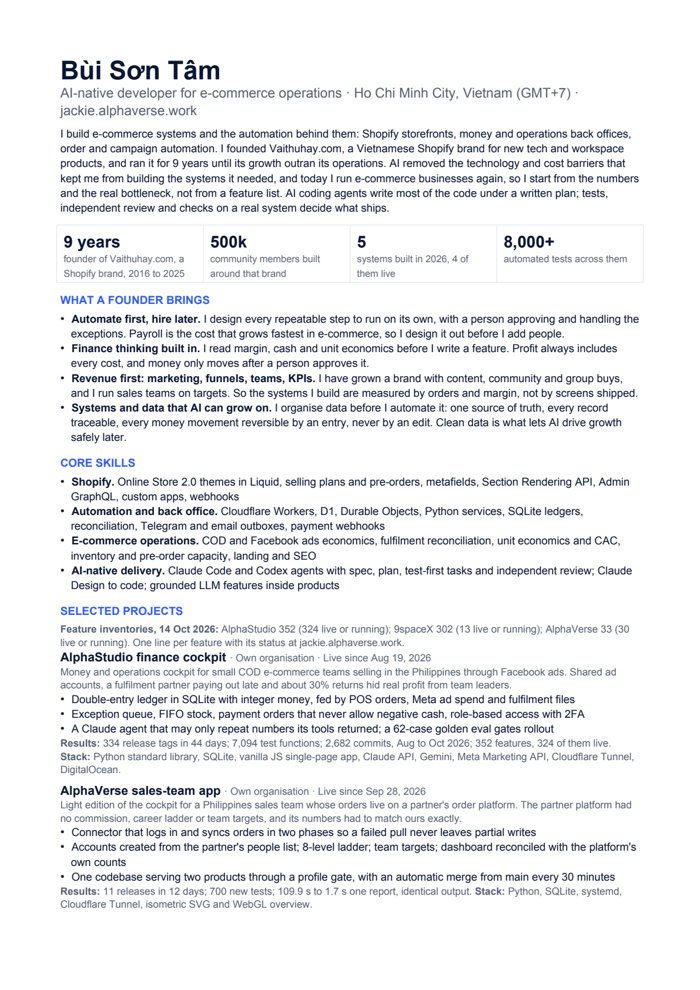
A two-page CV and a 13-slide capability deck, as PDF or PowerPoint.
Send me your store and the job you want off your plate. I'll tell you what can be automated, what should stay with a person, and what a first fixed-price milestone looks like.
Find me on Upwork as Bùi Sơn Tâm (Bui Son Tam). Fixed-price milestones, written updates every working day.